


Chasing down who signed out the master key at 6pm on a Friday, then cross-checking that against your building's swipe-card report, wastes real time and still leaves gaps a paper log can't close. Set up a live handoff between your electronic key cabinet's audit trail and your access control system, and every key withdrawal shows up in the same record as door swipes, badge scans and alarm events — one timeline instead of two.
- Key cabinet access control integration only works with electronic locking cabinets — mechanical key-locked units keep no digital trail to sync.
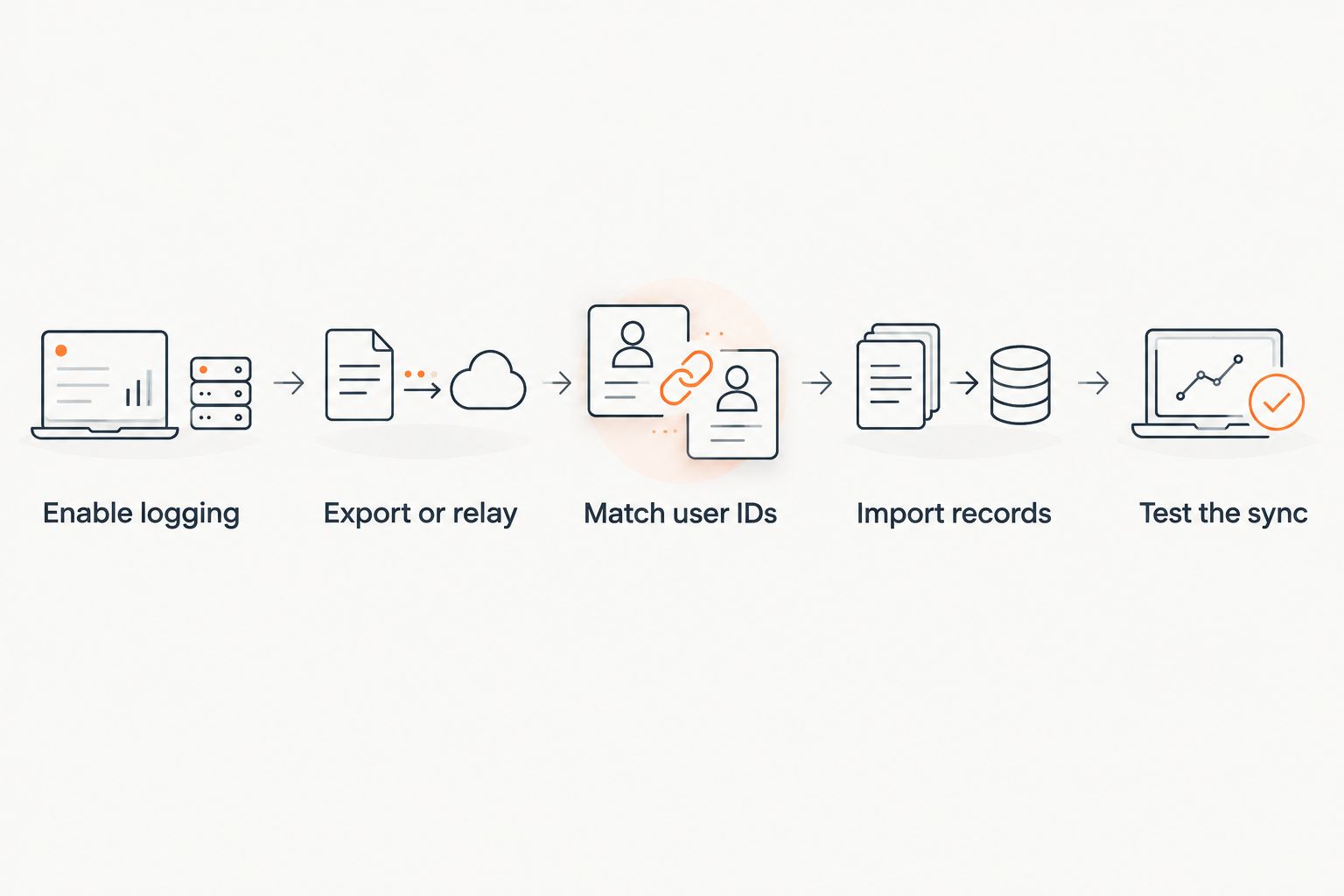
- Match key cabinet user IDs to access control credentials before you export or wire anything.
- Scheduled CSV/SQL export and dry-contact relay are the two realistic integration paths for most sites in 2026.
- Test the sync with one key before rolling the workflow out cabinet-wide.
- Add an alert for keys not returned within a set window so the audit trail catches problems same-day, not at month-end.
Why this matters
An access control report tells you who opened a door. It says nothing about who's holding the master key to the server room, the site office, or the drug cabinet three rooms past that door. A Secuguard AP-534EK electronic locking key cabinet closes that gap because it logs every withdrawal against a PIN or fob, the same way a badge reader logs every swipe — but only if that log actually reaches the system your security team is already watching.
Insurers and auditors increasingly ask for one accountability record, not two separate ones that need manual reconciliation. Key cabinet access control integration turns a standalone key log into part of your existing access control audit trail, which is the difference between proving who had a key at 4:12pm and guessing.
Before you start
- An electronic locking key cabinet with built-in audit logging — a cabinet with a physical key or combination lock has nothing to export. Check the product's lock type before you buy or before you plan the integration.
- Admin rights on your access control software, plus a current list of staff already set up as users or badge holders in that system.
- A network connection or USB port at the cabinet's install location — most cabinet audit logs export as a file, not a live stream, so you need a reliable way to pull that file on a schedule.
The gotcha that catches most sites: key cabinet software and access control platforms almost never share a live API out of the box. Budget for a scheduled export-and-import loop with a lag measured in hours, not a real-time hook — plan the workflow around that from day one instead of discovering it at step four.
Set up your key cabinet as the trigger
- Open the cabinet's admin panel and create a unique PIN or fob credential for each staff member — reuse the same employee ID or reference number your access control system already uses, so the two records line up later without a manual lookup table.
- Find the Enable Audit Log or equivalent setting in the cabinet's configuration menu and turn it on. Set the log to capture both key removal and key return events, not just removal — a return-time gap is often the more useful flag.
- Check the Export Format field. Most cabinets default to CSV; confirm your access control platform's import tool accepts that format before you build the rest of the workflow around it.
Expected result: the cabinet now produces a timestamped entry — user ID, key slot, action, time — for every open and close of the door.
Configure the export or relay
There are two workable paths depending on what your access control system supports. A comparison keeps the decision honest:
| Integration path | How it works | Best for |
|---|---|---|
| Scheduled CSV/SQL export | Cabinet exports a log file on a timer; access control software imports it on a matching schedule | Sites that need a searchable combined record but don't need instant alerts. Buy this path if your access control platform has a bulk-import tool. |
| Dry-contact relay to a supervised zone | Cabinet's relay output wires into a spare input on the access control panel, treated like a door contact | Sites that already monitor door-forced or door-held-open alarms and want a missing key treated the same way. Buy this path if your access control panel has a free supervised input. |
| Manual daily reconciliation | Someone exports the log and checks it against the access report by eye | Sites with a single cabinet and low staff turnover. Wait on automating until the manual process actually breaks down — it's a legitimate stopgap, not a long-term fix. |
For the export route: set the cabinet to write its log to a shared folder or send it by scheduled email, then point your access control software's import job at that same location on a matching 24-hour cycle. For the relay route: wire the cabinet's dry-contact output to the access control panel's spare input and configure that zone in the panel software exactly like a door sensor — a key withdrawal now reads as an open event and a return as a close event.
Map users between systems
- Export the current user list from the key cabinet's admin panel.
- In your access control software's user directory, match each entry by employee ID rather than by name — names get typo'd, ID numbers don't.
- Standardise on one naming convention across both systems before you go live, not after: "J.Smith" in one system and "Smith, John" in the other is the single most common reason a sync report shows false mismatches.
Expected result: every key event in the cabinet log resolves to the same named person as their badge swipes, with no manual lookup required.
Import the audit trail into your access control system
- Point the access control software's import or integration module at the export folder or relay zone you configured above.
- Run a manual import first rather than waiting for the schedule — this surfaces format errors immediately instead of silently failing overnight.
- Confirm the imported entries appear on the same timeline or report as door and badge events, searchable by user and by date.
Expected result: pulling a report for any staff member now shows their door access and their key withdrawals in one place.
Variant: alert when a key isn't returned
The same relay setup that feeds an access control system can also trigger an alert rather than just a log entry. Configure the access control panel to treat an open (key-out) event on the key cabinet's zone as an armed condition, and set a timer — most panels support a 60-second to several-hour delay window — after which an unreturned key trips the same notification path as a door-held-open alarm. This turns a passive audit trail into an active flag, which matters most for master keys and keys to restricted areas.
Troubleshooting
- Timestamps don't line up between the two logs. Both systems need to sync to the same time source. Point both the key cabinet's controller and the access control panel at the same NTP server so entries land within a second or two of each other.
- User IDs match in theory but the import shows mismatches. Check for trailing spaces or case differences in the ID field — most import tools compare strings exactly, not loosely.
- The export file gets rejected by the access control importer. Open the CSV and confirm the column headers match what the importer expects; a cabinet firmware update can silently change the export format.
- The relay doesn't trigger the access control zone. Confirm the cabinet's relay is wired to a supervised input, not a plain unsupervised output — an unsupervised wiring won't flag a cut wire as a fault, which defeats the point of an audit-grade connection.
- Duplicate log entries after a manual retry. Most import tools aren't set to de-duplicate by default; check for an option to skip records with a matching timestamp and user ID before re-running an import.
Customize your workflow
Once the base integration is running, extend it rather than leaving it as a one-off project. Sites managing keys across multiple people on the same shift often need a second signature before a sensitive key comes out — see how to choose a safe with dual custody access for retail teams for how that layer stacks on top of an audit trail. Sites running several cabinets across different addresses should centralise the reporting rather than reconciling each cabinet separately — the workflow above scales the same way whether it's one cabinet or ten.
“If a key cabinet can't export a timestamped log, it can't feed an access control system — that's the first thing to check before buying, not after.”
FAQ
What is key cabinet access control integration?
It's the process of feeding a key cabinet's audit trail — who took which key and when — into the same access control system that logs door swipes and badge scans. The result is one combined record instead of two separate logs that have to be checked by hand.
Do I need a specific type of key cabinet to integrate with access control?
Yes — the cabinet needs electronic locking with built-in audit logging, not a mechanical key or combination lock. Mechanical cabinets don't generate a digital record, so there's nothing to export or wire into an access control panel.
Can a key cabinet connect directly to an access control system in real time?
Most setups in 2026 run on a scheduled export-and-import loop rather than a live API connection, so expect a lag of hours between a key event and its appearance in the combined report. A dry-contact relay wired to a supervised alarm zone gets closer to real time for missing-key alerts specifically.
How do I match users between a key cabinet and an access control system?
Match by employee ID number, not by name — names get entered inconsistently across systems and break automated matching. Standardise the ID format in both systems before the first export.
What happens if a key isn't returned to the cabinet?
With a relay wired into a supervised access control zone, an unreturned key can trigger the same alert path as a door-held-open alarm after a set delay window. Without that setup, the gap only shows up the next time someone checks the audit log.
Is a CSV export or a relay connection better for key cabinet integration?
A scheduled CSV or SQL export suits sites that want a searchable combined record without instant alerts. A dry-contact relay suits sites that already monitor supervised alarm zones and want a missing key treated the same way as a forced door.
Why do timestamps on the two logs sometimes not match?
The key cabinet controller and the access control panel are running off different clocks. Pointing both at the same NTP time source fixes drift and keeps entries aligned within a second or two.
Can one key cabinet feed multiple access control panels?
Yes, provided the export file or relay output can be read by more than one system — most sites route it through a central access control server rather than wiring one cabinet to several panels directly.
One last thing
The integration usually isn't the hard part — mapping user IDs correctly the first time is. Sites that skip that step and fix it retroactively spend more time reconciling six months of mismatched records than they would have spent getting the ID format right before the first export. Get that one detail right in 2026 and the rest of the sync runs itself.